
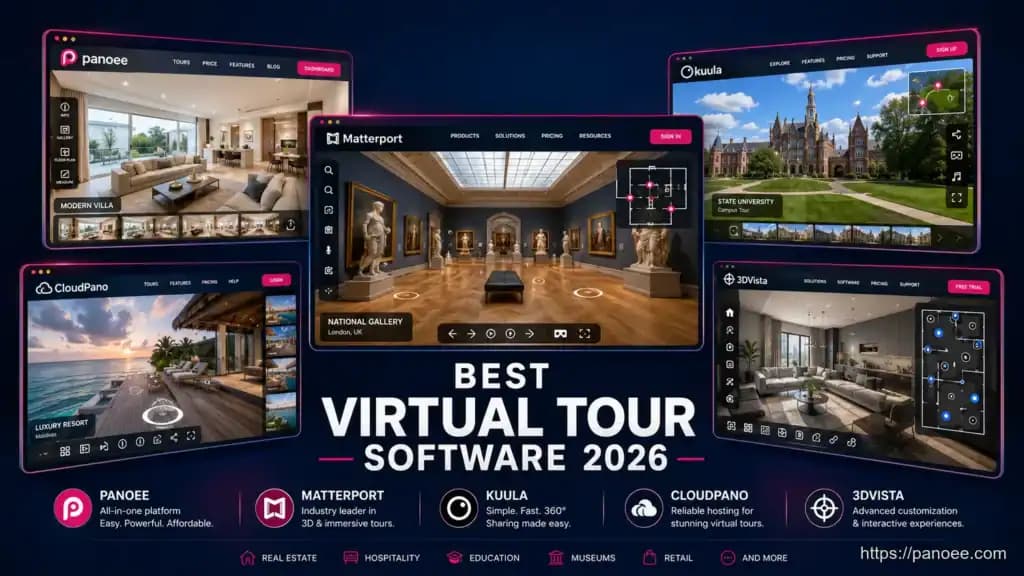
The best virtual tour software in 2026 depends on your workflow, budget, and hardware. After testing the top platforms, here is the short answer: Panoee leads on free plan value and flexibility, Matterport on 3D scanning depth, Kuula on photographer simplicity, CloudPano on real estate branding, and 3DVista on offline desktop control. Read on for the full comparison — including a feature table, pricing breakdown, and use-case guide — so you can pick the right tool on the first try.
- Panoee’s Free Forever plan includes unlimited projects, 3 GB storage, 7 hotspot types, and zero watermarks — the most generous free tier in this category.
- Matterport delivers the most immersive 3D scans but typically requires its own proprietary camera hardware, raising entry costs significantly.
- 3DVista is a one-time-purchase desktop app that lets you self-host tours offline — ideal if you never want a subscription.
- Panoee supports any 360 camera (Ricoh Theta, Insta360, etc.) and processes images up to 32K resolution via Multi-Resolution streaming.
- Google Tour Creator is shut down — Panoee is the most feature-equivalent free browser-based replacement available in 2026.
Quick Answer: Which Software Wins for Each Goal?
| Goal | Best Pick | Why |
|---|---|---|
| Best free plan | Panoee | Unlimited projects, no watermark, 3 GB free |
| Best 3D scanning | Matterport | Proprietary depth-sensor cameras, dollhouse view |
| Best for photographers | Kuula | Clean UI, large community, easy embed |
| Best for real estate agents | CloudPano | Custom branding, MLS-friendly workflow |
| Best desktop / offline | 3DVista | One-time purchase, self-hosting, no internet needed |
| Best hardware-agnostic SaaS | Panoee | Works with any 360 camera, cloud-based, scalable |
Full Feature Comparison: Panoee vs Matterport vs Kuula vs CloudPano vs 3DVista
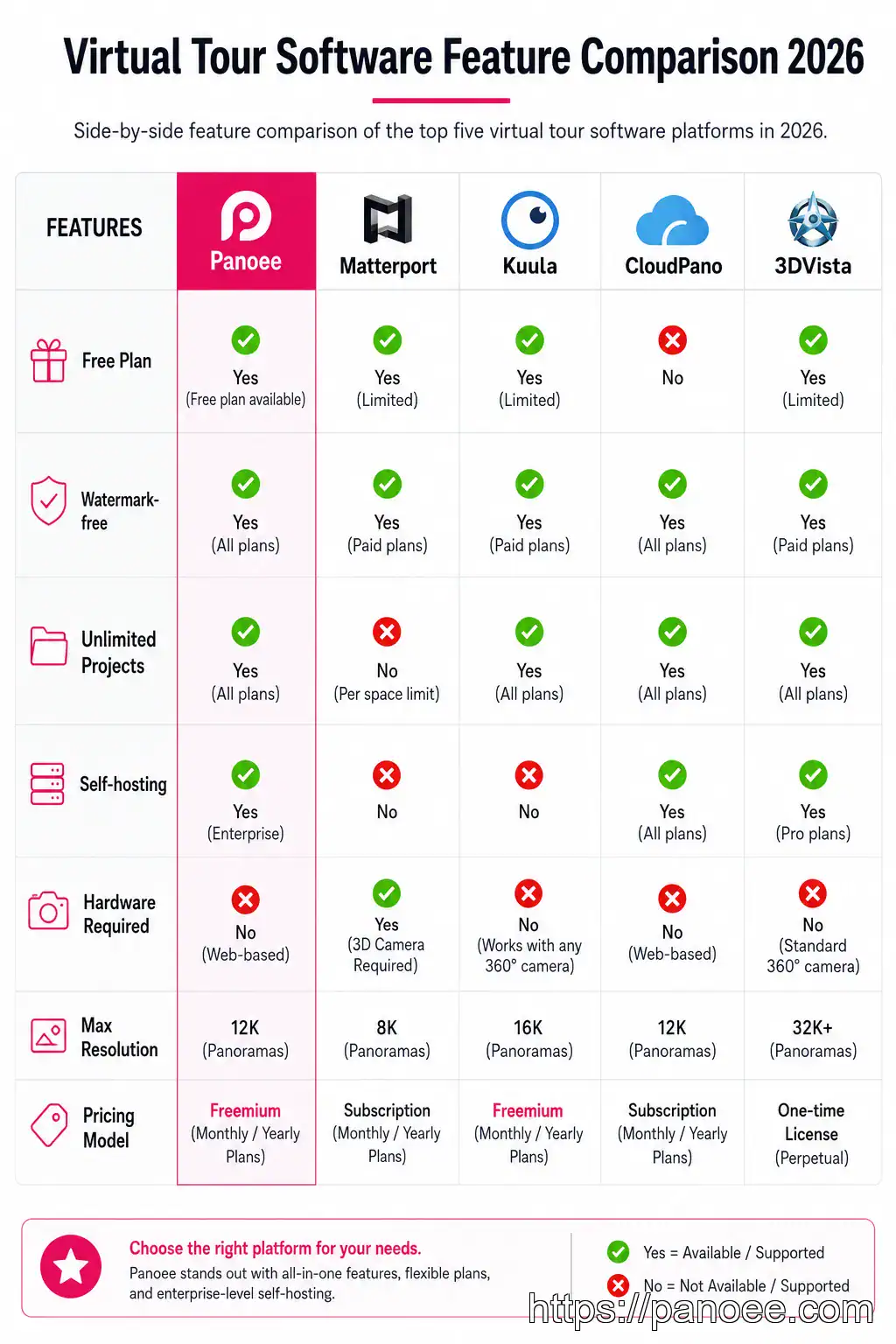
| Feature | Panoee | Matterport | Kuula | CloudPano | 3DVista |
|---|---|---|---|---|---|
| Free plan available | ✅ Yes | ✅ Limited | ✅ Limited | ✅ Limited | ❌ Trial only |
| Watermark-free on free tier | ✅ Yes | ❌ No | ❌ No | ❌ No | N/A |
| Unlimited projects (free) | ✅ Yes | ❌ No | ❌ No | ❌ No | N/A |
| Max panorama resolution | 32K | Proprietary | Standard | Standard | High |
| Self-hosting / ZIP export | ✅ Yes | ❌ No | ❌ No | ❌ No | ✅ Yes |
| Hardware-agnostic | ✅ Any 360 cam | ❌ Own camera | ✅ Yes | ✅ Yes | ✅ Yes |
| Browser-based (no install) | ✅ Yes | ✅ Yes | ✅ Yes | ✅ Yes | ❌ Desktop app |
| Floorplan integration | ✅ Yes | ✅ Yes | ❌ Limited | ✅ Yes | ✅ Yes |
| Lead capture forms | ✅ Yes | ❌ No | ❌ No | ✅ Yes | ❌ No |
| Google Street View publish | ✅ Yes | ❌ No | ✅ Yes | ❌ No | ❌ No |
| Google Analytics integration | ✅ Yes | ❌ No | ❌ No | ❌ No | ❌ No |
| Offline / no-internet use | ❌ Cloud | ❌ Cloud | ❌ Cloud | ❌ Cloud | ✅ Yes |
| Pricing model | Free + SaaS | Subscription | Subscription | Subscription | One-time purchase |
Google Tour Creator was discontinued in 2021. If you are searching for a free, browser-based replacement with no install required, Panoee is the closest functional equivalent — offering unlimited projects, hotspots, and publishing tools at no cost. Panoee also lets you publish directly to Google Street View, preserving that workflow.
Understanding the Three Business Models
Not all virtual tour software charges the same way. Picking the wrong model can lock you into unexpected costs — or unnecessary hardware purchases.
Cloud SaaS (Panoee, Kuula, CloudPano)
You log in via browser, create tours online, and host them on the provider’s servers. No installation. Updates are automatic. Pricing is monthly or annual. Best for: teams, agencies, and anyone who wants to start immediately without setup friction.
If your use case leans more toward immersive VR headset delivery rather than standard browser viewing, our dedicated breakdown of VR tour software compares platforms built specifically for that workflow.
Hardware-locked ecosystem (Matterport)
Matterport’s flagship experience requires its own depth-sensing cameras (Pro2, Pro3) or compatible devices. The camera captures accurate 3D point-cloud data that powers the “dollhouse” view no other platform replicates natively. Best for: high-end property developers, AEC firms, and enterprise clients where true 3D fidelity justifies the hardware investment.
Desktop one-time purchase (3DVista)
You buy the software once, install it on your PC or Mac, and export tour files to host wherever you choose — your own server, a USB drive, or offline on a laptop. No recurring fees. No internet required at the venue. Best for: independent photographers who deliver tour files to clients, or use cases where internet connectivity is unreliable.
Best Virtual Tour Software by Industry
🏠 Real Estate
Panoee or CloudPano — Panoee offers Lead Capture Forms and Floorplan integration; CloudPano integrates with MLS-friendly workflows and custom branding for agency white-labeling.
🏛️ Museums & Education
Panoee — Used by Bangor University and University of Lincoln. Supports eCommerce hotspots, Tour Guide audio narration, and Google Analytics for visitor tracking.
📸 360 Photographers
Kuula or Panoee — Kuula has a large community; Panoee adds 32K resolution, Multi-Resolution streaming, and Nadir Logo removal for a more polished client deliverable.
For a deeper look at the real estate use case, see our guide on virtual tour real estate strategies for agents and brokers or explore how 360 real estate photography pairs with these tools.
If you are building tours for hospitality, the hotel virtual tour guide covers booking-lift tactics specific to that vertical. For education, virtual campus tours explains how universities use 360° open days to drive enrollment.
Panoee Deep Dive: Why It Leads the Free Tier
Panoee (panoee.com) is a web-based virtual tour builder hosted on Amazon Web Services (AWS), meaning fast global load times without any server management on your end. Here is what makes it stand out:
Multi-Resolution 32K Streaming
Panoee’s Multi-Resolution technology tiles high-resolution panoramas so they load instantly — even a 32K image streams progressively rather than forcing a viewer to wait for a full download. For photographers who shoot with high-megapixel cameras, this is a direct quality advantage. Learn more about how Multi-Resolution works for virtual tours.
Hotspot Ecosystem
Unlike platforms that offer a single link-type hotspot, Panoee provides 7 hotspot types including:
– Polygon hotspots — outline irregular shapes on screen
– eCommerce hotspots — link products with price and buy button
– Tour Guide hotspots — add audio/video narration per scene
Publish Anywhere
Tours can be published to Panoee’s CDN, embedded on any website via iframe, exported as a ZIP for self-hosting, or published directly to Google Street View. This flexibility is rare — most SaaS competitors lock you into their hosting.
Hardware Agnostic
Panoee works with any 360 camera — Ricoh Theta, Insta360, and more. There is no proprietary hardware to purchase, making the barrier to entry effectively zero.
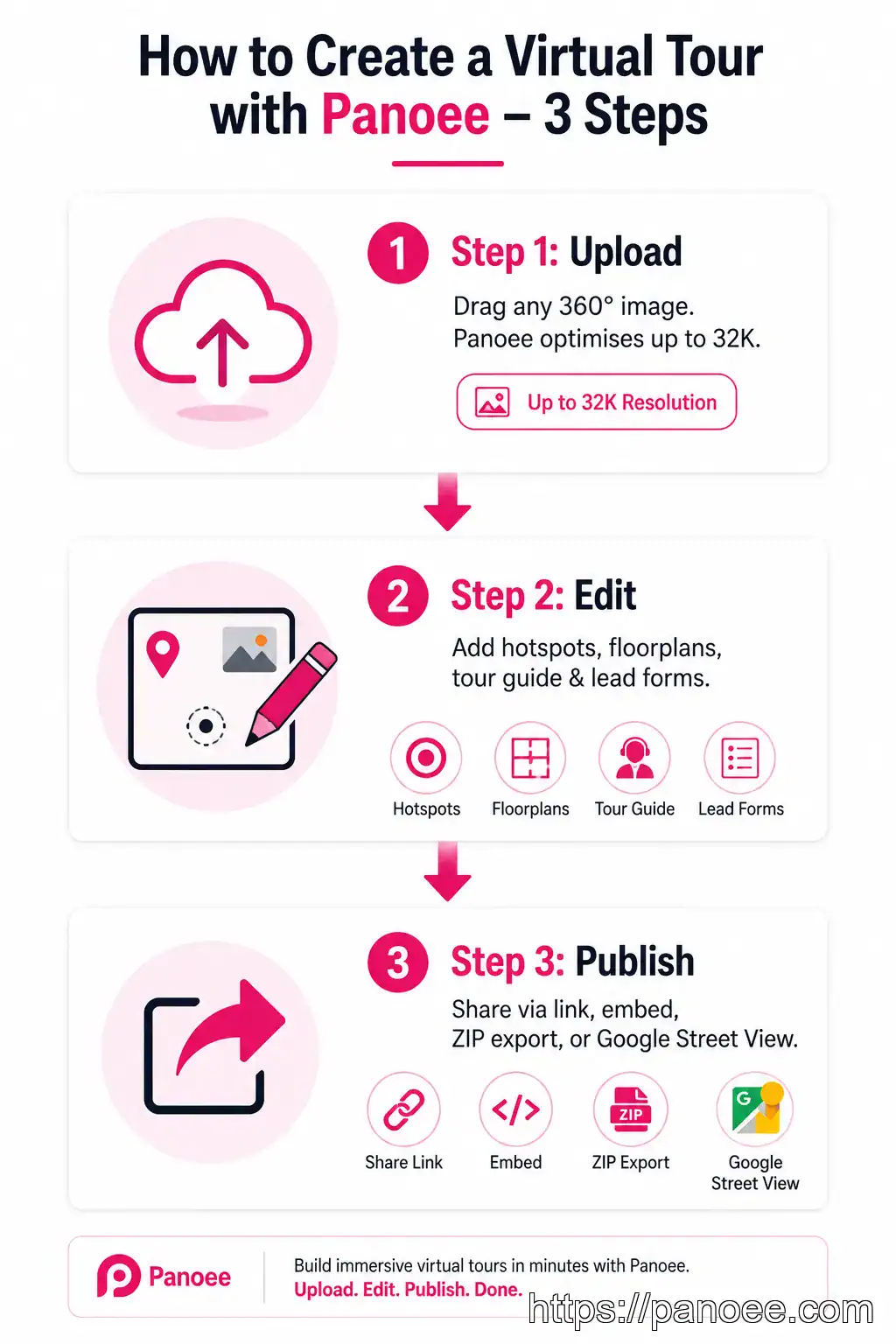
- Upload Drag any 360° panorama (or standard photo) into Panoee. Resolution up to 32K is accepted and automatically optimized via Multi-Resolution tiling.
- Edit Add hotspots (Polygon, eCommerce, Tour Guide), attach a Floorplan, insert a Lead Capture Form, apply a Nadir Logo to hide the tripod shadow, and set scene transitions.
- Publish Share via a public link, embed on WordPress or Wix via iframe, export as a ZIP for self-hosting, or push directly to Google Street View — all from the same dashboard.
Pricing at a Glance
| Plan | Price | Key Limits |
|---|---|---|
| Free Forever | $0/month | Unlimited projects, 3 GB storage, 7 hotspot types, no watermarks on panoramas |
| Pro / Companion | ~$22/month | Custom domains, 14-day trial available |
| Enterprise | Variable | White-labeling, 20 GB+ storage, 5 team roles |
| Storage Overage | ~$0.12–$0.15/GB/month | Only charged when you exceed plan storage |
For the full breakdown of what’s included at each tier, see Panoee’s pricing plans — the summary below covers the key differences at a glance.
Panoee’s free tier is structurally different from competitors: no watermark and no project cap mean you can build a full client portfolio before spending a dollar. The Pro plan adds custom domains and removes any remaining platform branding, making it viable for agency use. For detailed pricing, see the Panoee pricing breakdown.
If you are comparing Panoee directly against individual competitors, these guides go deeper:
– Panoee vs Kuula
– Panoee vs CloudPano
– Panoee vs Matterport
– Panoee vs 3DVista
Frequently Asked Questions
What is the best free virtual tour software in 2026?
Do I need special hardware to create virtual tours?
What replaced Google Tour Creator?
Can I host virtual tours on my own server?
What is the best virtual tour software for real estate?
Is there good 3D house tour software that is affordable?
Start Building for Free with Panoee
Create unlimited virtual tours — free, forever, no watermarks
Works with any 360° camera. No software to install. Publish in minutes via link, embed, or Google Street View.
🚀 Start Free on PanoeePanoee is built on AWS, trusted by institutions like Bangor University and the University of Lincoln, and reviewed by photographers and agencies on Capterra. The Free Forever plan has no expiry — upgrade only when you need custom domains or white-labeling for client work.
For photographers starting a 360 business, our 360 photography business guide covers how to package and price virtual tour services using tools like Panoee from day one.
📅 Content has been updated: 08/07/2026
