
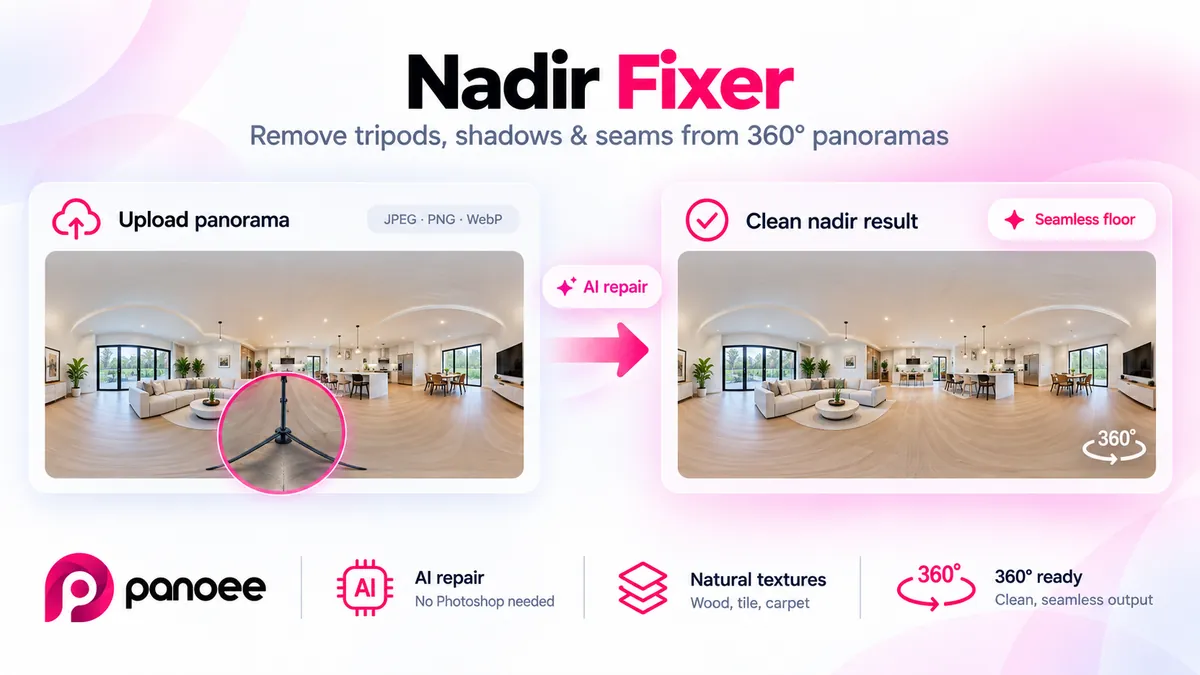
A nadir fixer patches the bottom of a 360 photo where a tripod or stitch hole usually sits. On this page you preview sample floors; Generate opens Panoee Studio. You still start from a JPEG, PNG, or WebP sphere — this landing does not process the file here.
Last updated: September 8, 2026
What is a nadir fixer?
A nadir fixer covers or restyles the nadir — the bottom of an equirectangular 360 photo. In geometry, the nadir is the direction straight down from the observer; see Nadir (Wikipedia). On a tripod shot that patch is often legs, a shadow, or a black hole from the stitch.
This URL is the Panoee landing. The working tool is Panoee Studio Nadir Fixer. The drop zone and Generate button deep-link there. The before/after tiles on the right are samples, not a live job from your upload.
It is not Photoshop, not a full tour builder, and not a promise that every floor type will reconstruct automatically.
Key takeaways
- Public name on this URL is Nadir Fixer
- Start from a 360 JPEG, PNG, or WebP
- This page previews samples; Generate continues in Studio
- A floor-looking fill is different from a logo disc
- Check the sphere in the 360 panorama viewer before you publish
What is the nadir in a 360 photo?
The nadir is the ground under the camera. A 360 camera on a pole or tripod cannot see through its own support, so that region is either missing or filled by the stitcher with whatever it saw — often metal legs, a shadow, or a smear.
Viewers look down. A dirty nadir is the first thing that breaks the “I am in the room” feeling, even when the walls are sharp.
Common nadir problems
- Tripod or pole — legs and the head sit in the center of the floor
- Shadows — hard sun or a flash draws a second copy of the support
- Stitch seams — handheld or multi-shot spheres often tear at the bottom
- Logo discs — a branded patch hides the hole but reads as a sticker, not a floor
These are why people look for a nadir fixer instead of leaving the raw stitch in a tour.
How nadirs were fixed before a dedicated tool
Typical work without Studio:
- Open the equirectangular in Photoshop or similar
- Clone or heal a ring around the hole until the tripod disappears
- Or drop a circular logo / “powered by” badge on the nadir
That still works. It also takes attention per scene, and clone strokes often repeat a tile or blur a grout line. A logo is faster and honest as branding, but it never looks like the floor.
Nadir fixer vs logo patch
A logo patch is a graphic you place on purpose: brand, agency mark, or a simple color disc. It is predictable and easy to redo. It does not pretend to be tile or wood.
A nadir fixer aims for a floor-looking fill so the viewer can look down without seeing gear. The samples on this page show that kind of result. It is still a still-image edit of one sphere. It does not add hotspots, and it does not rebuild the room in 3D.
Use a logo when the client wants the mark on every scene. Use a floor fill when the brief is immersion. Do not treat either as a measured survey of the floor.
How to Use
-
Prepare a 360 photo
- Use a JPEG, PNG, or WebP equirectangular. A 2:1 sphere is what most viewers expect.
-
Review the samples
- Compare the dirty vs cleaned tiles on this page so you know the look Studio is targeting.
-
Continue in Studio
- Generate opens Panoee Studio Nadir Fixer. Sign in there to upload and run the job. Nothing you change on this landing starts a job — there is no in-browser generate.
-
Preview, then publish
- Open the result in the 360 panorama viewer. If you later compress a JPEG for social, run 360 EXIF Fixer so Photo Sphere tags stay on the file.
This page vs Studio
The yellow notice already says Nadir Fixer has moved to Studio. The selects you might expect from other Panoee landings are not here: one link, one generate button, and a sample comparison. That is intentional. panoee.com keeps the marketing URL; Studio keeps the job next to the rest of the dashboard.
If you already have a Studio account, open Nadir Fixer there and skip the sample download. The sample “Download” on this page saves a demo PNG, not your panorama.
Limits
- No in-browser fix — upload happens in Studio
- Source should already be a 360 sphere. A flat wide photo will not become a nadir patch
- Output is a still image. You still place it in a tour or viewer yourself
- Floor fill quality depends on the source. A blown-out white floor or a busy patterned carpet can still look patched
- This page is not virtual tour software and not an optimizer
FAQ
What is the nadir in a 360 panorama? The bottom of the sphere — usually the floor under the tripod.
Does this page fix the nadir in the browser? No. Generate opens Panoee Studio Nadir Fixer.
Do I need Photoshop? No. You need a 360 JPEG, PNG, or WebP and a Studio login to run the job.
Is a nadir fixer the same as a logo patch? No. A logo is a branded disc. A nadir fixer aims for a floor-looking fill.
Will it match every floor? Not guaranteed. Check the result against the real room and the rest of the stitch.
Can I preview the sphere after I download? Yes. Use the 360 panorama viewer on Panoee.
Summary
A nadir fixer covers the worst part of a tripod 360 — the floor hole — so a tour can look down without showing gear. On Panoee.com you compare samples; Studio runs the job. Start from a JPEG, PNG, or WebP, continue in Studio, then check the sphere in the viewer. Use a logo patch when you want the brand; use a floor fill when you want the ground to read as ground.
