

A virtual tour is an interactive, digital simulation of a real-world location — composed of stitched panoramic images, 3D models, or video — that gives users full control to navigate a space remotely. Unlike watching a passive video, visitors can look up, down, and around in 360 degrees, move between rooms via clickable hotspots, and access embedded information without ever setting foot on-site.
- A virtual tour is built from panoramic images or 3D scans stitched together into an interactive experience — not a pre-recorded video.
- There are 3 main types: 360° Photo Tours, 3D Virtual Tours (Digital Twins), and Video Tours — each with different use cases and costs.
- Users navigate via hotspots: clickable elements that move between scenes or reveal text, images, video, and links.
- Modern tours support ultra-high resolutions (up to 32K), VR headsets, floorplan integration, and e-commerce links — all running on HTML5 with no plugin required.
- Sites with virtual tours see users spend 5–10× longer on-page, significantly improving lead qualification and engagement.
How a Virtual Tour Works: The Technology Behind It
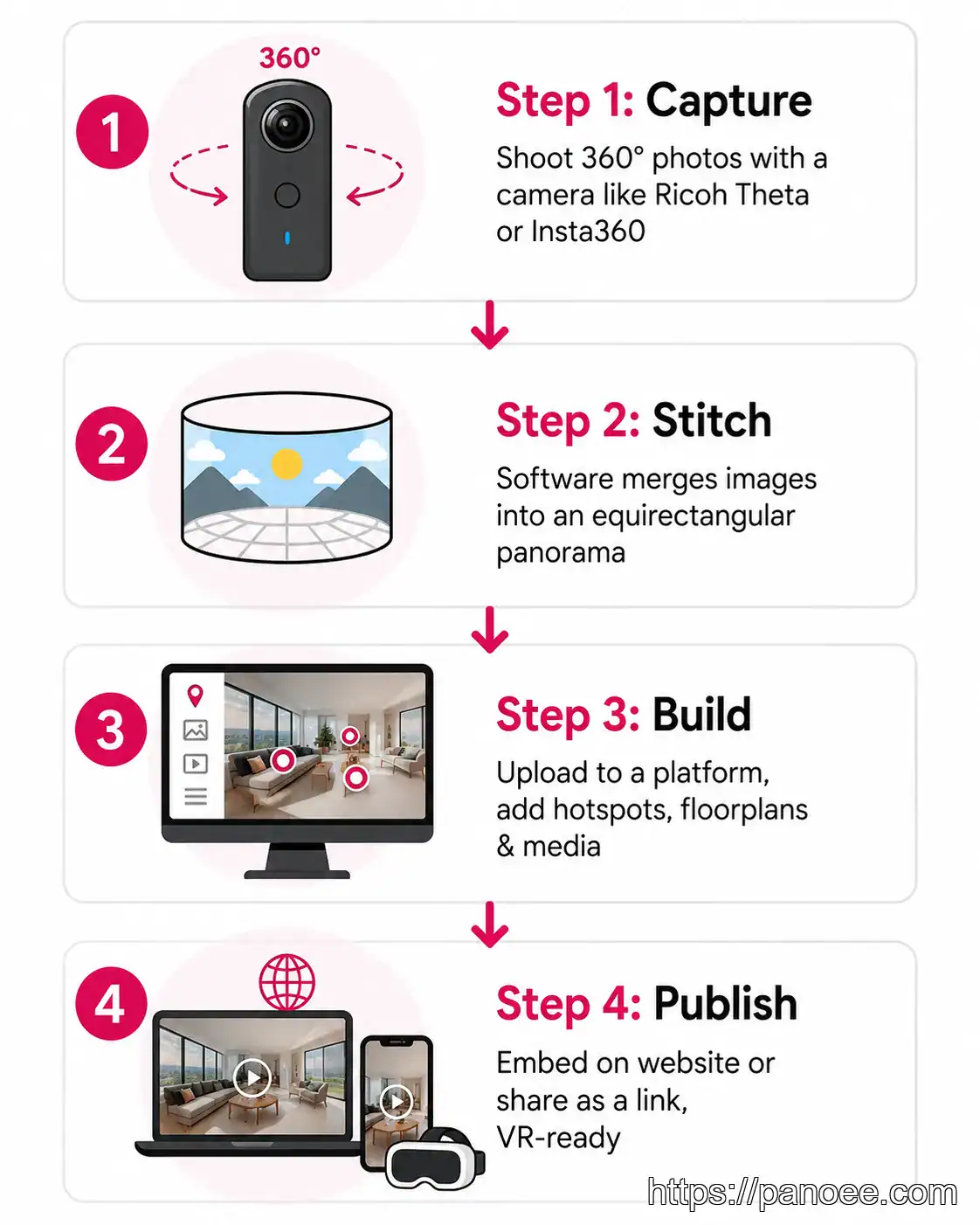
Understanding the mechanics helps you evaluate which platform and workflow fits your needs.
At its core, a virtual tour relies on a format called an equirectangular image — a 360° panorama mapped onto a flat rectangle, similar to how world maps project a sphere. When displayed in a viewer, this image is re-projected onto the inside of a sphere, creating the sensation of standing inside the space.
- Capture: A 360° camera (such as a Ricoh Theta, Insta360, or equivalent) shoots in all directions simultaneously. For more on hardware options, see our guide to the [best 360 cameras for virtual tours](https://panoee.com/best-360-cameras-for-virtual-tours/).
- Stitch & Process: The camera’s dual lenses produce two wide-angle images that software automatically blends into a single equirectangular panorama. High-end platforms use **multi-resolution tiling** — pre-rendering the image at multiple zoom levels — so only the tile the viewer is currently looking at loads, enabling fast performance even at 32K resolution.
- Build: Panoramas are uploaded to virtual tour software. The creator links scenes together, adds interactive **hotspots**, embeds media (text, images, video, forms), and configures navigation elements such as a floorplan map.
- Publish & Embed: Modern tours are built on **HTML5**, meaning they run in any browser on desktop, mobile, or VR headset — no plugin required. Tours are shared via a link or embedded directly on a website.
What Are the Benefits of a Virtual Tour?
Why is this technology exploding in popularity? What are the benefits of a virtual tour? Here are the key advantages for businesses and users alike:
- 24/7 Open House: Your business or property is always open for inspection, regardless of time zones or holidays.
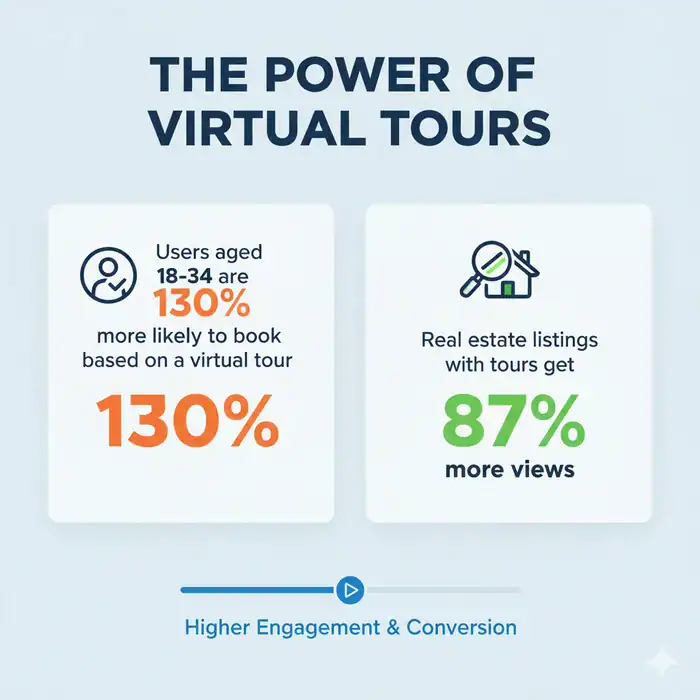
- Increased Engagement: Users spend 5–10 times longer on a website with a virtual tour than one without.
- Cost Efficiency: It filters out “tire kickers.” In real estate, potential buyers who schedule a physical viewing after a virtual tour are much more likely to close the deal.
- Trust and Transparency: What are the advantages of virtual tours? The biggest one is trust. You aren’t hiding anything behind clever camera angles; the user sees everything.
The 3 Main Types of Virtual Tours Compared
This is a gap competitors rarely address with clarity. Here is a structured comparison:
| Feature | 360° Photo Tour | 3D Virtual Tour (Digital Twin) | Video Tour |
|---|---|---|---|
| Core technology | Stitched equirectangular panoramas | LiDAR or photogrammetry scan | Pre-recorded video |
| User control | Full — look in any direction, move between scenes | Full — includes top-down “dollhouse” view | None — linear playback |
| Interactivity | Hotspots, media, forms, e-commerce | Measurements, 3D model, floor plans | Basic (pause/play) |
| File size / load speed | Light (especially with multi-res tiling) | Heavy — requires dedicated viewer | Medium (depends on video quality) |
| Hardware required | Any 360° camera; hardware-agnostic platforms accept 2D images | Specialized LiDAR scanner (e.g., Matterport Pro) | Standard video camera |
| Typical cost | Low–Medium | High | Low–Medium |
| Best for | Real estate, hospitality, education, tourism | Architecture, construction, insurance documentation | Storytelling, luxury listings |
| VR headset ready | ✅ Yes | ✅ Yes | ❌ No |
For a deeper breakdown of these formats, see Virtual Tour vs 3D Tour: Key Differences Explained.
For most businesses — real estate agents, hotels, schools, and tourism operators — a 360° Photo Tour delivers the best balance of cost, speed, and interactivity. 3D Digital Twins add measurable value for architecture and construction projects where accurate spatial data matters. Video Tours work well as a complement to interactive tours, not a replacement.
Key Features Modern Virtual Tours Support
The technology has evolved well beyond simple panoramic navigation. Here is what the current generation of virtual tour software enables:
Interactive Hotspots
Clickable elements that move users between scenes or surface embedded content — text, images, video clips, product links, or lead-capture forms — turning a tour into a sales or marketing tool.
Integrated Floorplans
A 2D or 3D floorplan overlay gives viewers spatial orientation and lets them jump directly to any room — a critical feature for real estate and hospitality tours.
E-Commerce & Lead Gen
Advanced platforms embed shoppable product hotspots and integrated contact forms directly inside the tour, enabling purchases or lead capture without the viewer ever leaving the experience.
Additional capabilities found in leading platforms include: direct publishing to Google Street View, green-screen tour guide overlays, custom domain publishing, offline export as a ZIP file, and team collaboration modes.
Where Virtual Tours Are Used: Industry Applications
Virtual tours have become a standard tool across multiple sectors:
- Real estate: Buyers pre-qualify properties remotely before scheduling physical visits — reducing wasted showings for agents. Explore the full workflow in our virtual tour real estate guide.
- Education: Universities publish 360° campus tours to attract prospective students globally. Institutions like Bangor University and the University of Lincoln use this format for virtual open days. See virtual campus tours for examples.
- Hospitality: Hotels and Airbnb hosts use interactive tours to showcase rooms and amenities, directly increasing booking confidence. Our hotel virtual tour guide covers best practices.
- Museums & galleries: Cultural institutions offer permanent online access to exhibitions, extending reach far beyond physical capacity. Discover virtual tour software for museums.
- Tourism & destinations: Travel brands use destination virtual tours to inspire visit intent before a trip is booked.
- Retail & showrooms: E-commerce brands embed shoppable tours to replicate the in-store browsing experience online.
Users consistently spend 5–10 times longer on pages featuring interactive virtual tours compared to those with static images or video, which translates directly into higher engagement metrics and better lead quality.
Honest Limitations of Virtual Tours
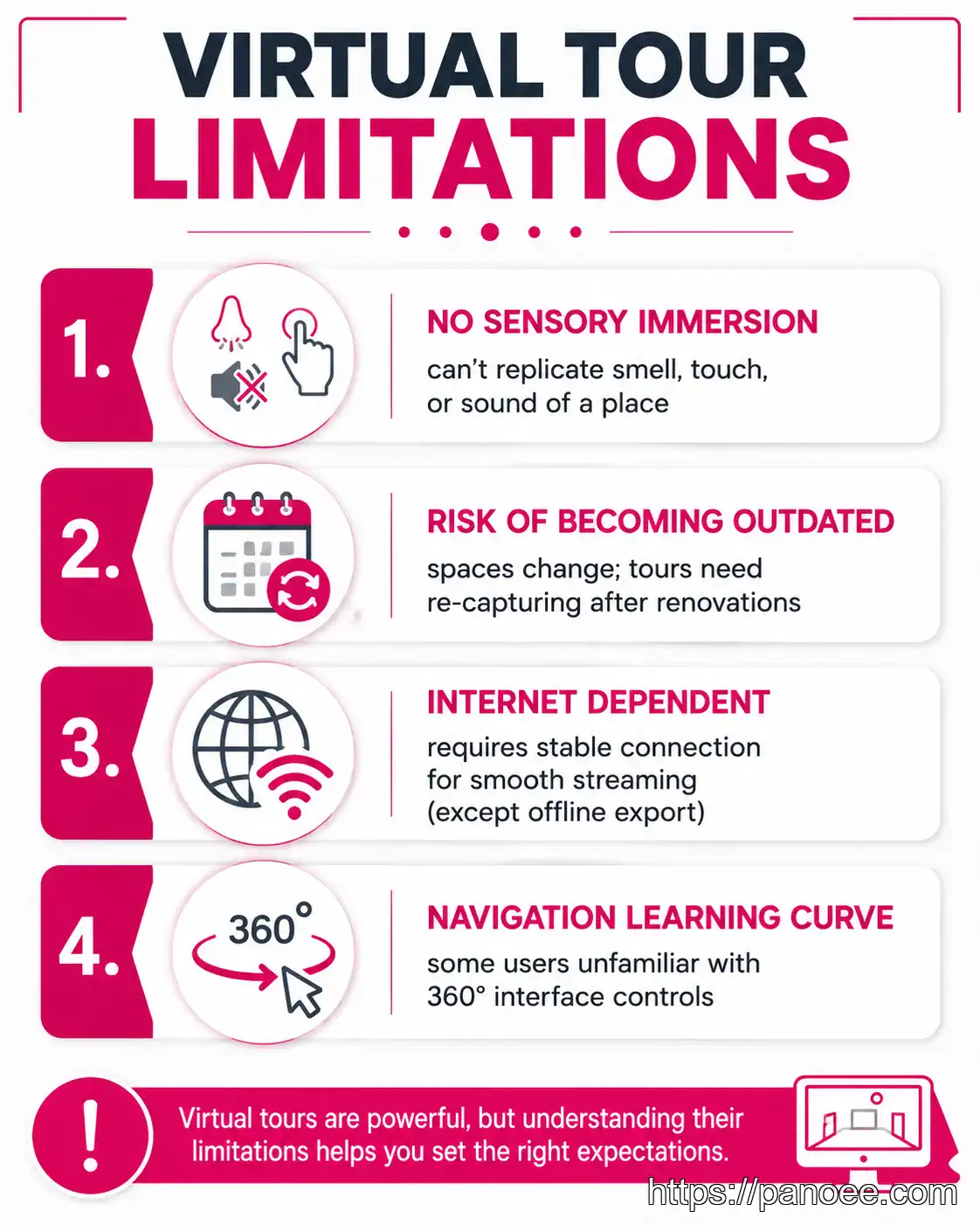
A balanced perspective is something competitors consistently avoid. Here is what virtual tours cannot replicate:
- No sensory immersion: A virtual tour cannot replicate smell, tactile texture, ambient sound, or the physical sensation of being in a space. It is a visual and informational tool, not a full sensory substitute.
- Risk of becoming outdated: Once a physical space is renovated, redecorated, or repurposed, the existing tour becomes inaccurate. Keeping tours current requires periodic re-capture.
- Connectivity dependency: Streaming high-resolution panoramas requires a stable internet connection. Platforms offering offline export (ZIP download for self-hosting) mitigate this, but it remains a consideration.
- Navigation learning curve: Older audiences or users unfamiliar with 360° interfaces may find controls unintuitive. Clear on-screen navigation cues and an introductory walkthrough help.
The initial creation cost is only part of the equation. Factor in recurring hosting fees, re-capture costs after renovations, and the time needed to update hotspot content as products or information changes. Platforms with a Free Forever plan eliminate hosting cost entirely for smaller projects. See the full virtual tour cost guide for a complete breakdown.
Create Your First Virtual Tour with Panoee
Panoee is a web-based virtual tour platform built to remove the barriers that make virtual tour creation feel complex or expensive.
Key platform facts:
| Panoee | |
|---|---|
| Free Plan | $0 forever — 3 GB storage, unlimited projects, no watermarks |
| Pro / Companion Plan | From ~$22/month |
| Storage add-on | ~$0.12–$0.15/GB/month |
| Infrastructure | Amazon Web Services (AWS) |
| Max resolution | 32K (multi-resolution engine) |
| Hardware | Hardware-agnostic — any 360° camera |
| Export | ZIP export for offline / self-hosting |
| Workflow | 2× faster creation and publishing |
Panoee’s Free Forever plan includes unlimited projects with no watermarks on panoramas — making it one of the very few platforms where you can build and share professional tours at zero cost. The platform is hardware-agnostic: it works with Ricoh Theta, Insta360, and any other 360° camera, or even 2D images and floorplans.
External reviews on Capterra and G2 reflect real user experience with the platform.
To start building, see the step-by-step how to create a virtual tour guide or explore the best virtual tour software comparison for 2026.
Frequently Asked Questions
What is the difference between a virtual tour and a video tour?
How does a virtual tour work technically?
What are the downsides of virtual tours?
What industries use virtual tours the most?
📅 Content has been updated: 09/07/2026
