
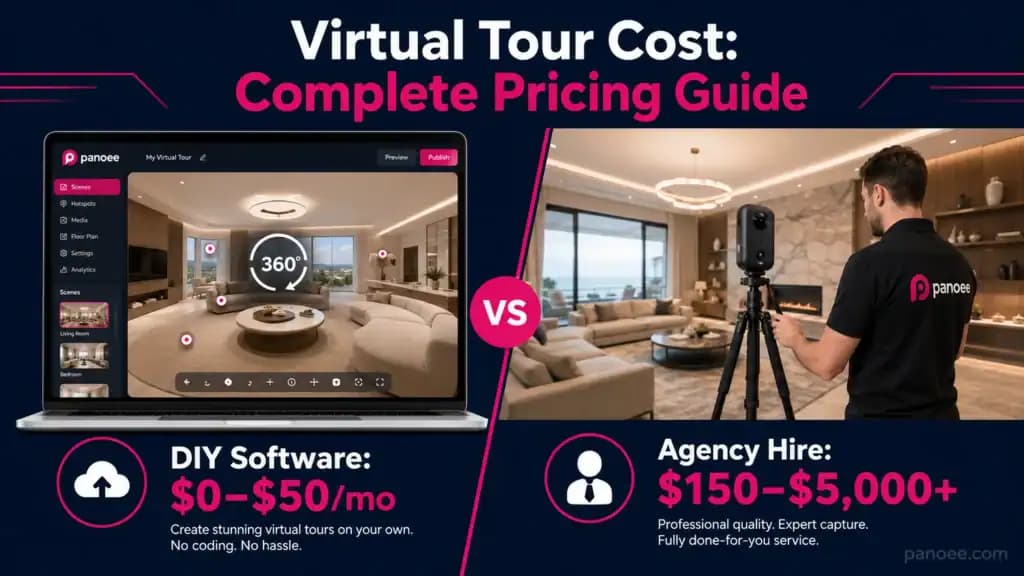
Virtual tour costs range from $0 (DIY software free plan) to $5,000+ (professional agency shoot for large commercial properties). The two cost structures are fundamentally different: software costs run $0–$50/month, while hiring a professional photographer runs $150–$5,000+ per project. Most businesses overpay by confusing these two buckets.
1. The Two Cost Structures Nobody Explains Clearly
Most “virtual tour cost” articles are written by local photography studios trying to justify their shoot fees. They’ll tell you virtual tours cost $300–$5,000 and leave it at that. That’s true — but only for one of two entirely different purchasing decisions.
Structure A: Hiring a Professional (Agency/Photographer) You pay a one-time fee for someone to come to your property, capture the space with professional 360° cameras, process the images, and deliver a hosted tour. You don’t touch any software. This is what the $300–$5,000 range describes. If you’re evaluating this route, the guide to virtual tour companies breaks down what to look for before signing any contract.
Structure B: Using Virtual Tour Software Yourself (DIY) You subscribe to a cloud platform, shoot your own 360° photos with a consumer-grade camera, upload them, and publish the tour yourself. Costs here range from $0/month to ~$50/month for the software, plus a one-time camera purchase if needed. If you want to see the full workflow, the step-by-step guide on how to create a virtual tour walks through exactly what this looks like in practice.
The right choice depends entirely on your use case, volume, and whether you already have 360° content. A real estate photographer shooting 50 properties a month needs software. A restaurant owner wanting one tour for Google Street View probably needs an agency.
This guide covers both — with real numbers, not vague ranges.
2. Virtual Tour Software Cost (DIY Route)
Virtual tour software platforms are SaaS tools that let you upload 360° photos, add interactive hotspots, and publish a hosted tour without writing any code. The price varies dramatically based on features, storage, and whether the platform uses forced watermarks or locked features on free tiers.
Virtual Tour Software Pricing Comparison (2026)
| Platform | Free Plan | Entry Paid Plan | Mid Plan | Notes |
|---|---|---|---|---|
| Panoee | $0 forever — unlimited projects, 3 GB, no watermarks | ~$22/month (Pro) | Enterprise (custom) | No credit card for free; PAYG billing |
| Kuula | Limited (1 published tour) | ~$20/month | ~$40/month | Watermark on free tier |
| CloudPano | Trial only | ~$49/month | ~$99/month | No permanent free tier |
| Matterport | 1 active space | $65/month (Starter) | $130/month (Professional) | Requires Matterport hardware for 3D |
| 3DVista | No SaaS free tier | ~$499 one-time (desktop) | ~$799 (Pro) | Desktop software, not cloud-native |
| Klapty | Free (limited) | ~$14/month | ~$28/month | Basic feature set |
| Ricoh360 Tours | First tour free | ~$40/month | ~$120/month | Integrates with Ricoh cameras |
For a deeper breakdown of how these platforms compare on features — not just price — see the full virtual tour software comparison. If you’re coming from 3DVista’s desktop licensing model, the 3DVista alternative page covers the specific migration tradeoffs. Similarly, if you’ve been evaluating virtual walkthrough software for property tours, the feature gap analysis there is directly relevant to this cost decision.
Key finding: Panoee is the only major platform offering a genuinely unlimited free plan with no watermarks on panoramas. Every competitor either limits published tours, forces branding, or requires a paid plan to do anything meaningful.
What the Software Monthly Fee Gets You
At the $0–$22/month software tier, you typically get:
- Cloud hosting for your tours
- An editing interface with hotspot tools
- Shareable links and embed codes
- Basic analytics
At $40–$130/month (mid-tier), you add:
- Custom domain support
- White-label options (remove platform branding)
- Team collaboration
- Advanced analytics and heat maps
- More storage (20 GB+)
At enterprise pricing ($200+/month or custom), you get:
- Full white-labeling
- API access
- Dedicated support
- SSO and role-based permissions
The Hidden Math on Software Pricing
Matterport’s pricing looks cheaper than it is. Their $65/month Starter plan allows only 5 active spaces. A real estate photographer shooting 20 properties a month hits that cap immediately and needs the $130/month plan — which still only covers 25 spaces. Beyond that, each additional space costs $5–$10/month in hosting. A photographer with 100 active listings on Matterport can easily pay $400–$600/month in platform fees alone. The Matterport alternative comparison covers this pricing structure in full, with a side-by-side feature and cost breakdown.
Panoee’s PAYG (Pay-As-You-Go) model solves this directly: you’re only charged in months when at least one premium tour is active. For businesses with seasonal demand or project-based work, this is a material cost difference.
3. Professional Virtual Tour Agency Cost
When you hire a professional to create a virtual tour, you’re paying for labor, professional equipment, post-processing time, and often hosting. Here’s what the market actually looks like in 2026. If you’re still deciding between hiring out and building in-house capability, the virtual tour companies buyer’s guide compares both paths with a detailed decision framework.
Agency Pricing by Property Type
| Property Type | Typical Price Range | What’s Included |
|---|---|---|
| Small residential (under 1,000 sq ft) | $150–$300 | 360° capture, basic editing, hosted tour, 1-year hosting |
| Average home (1,000–3,000 sq ft) | $300–$500 | Same as above, more scan points |
| Large home / luxury property (3,000+ sq ft) | $500–$1,000+ | Extended shoot time, more detail, often includes floor plan |
| Small commercial (retail, restaurant) | $499–$800 | Google Street View integration usually included |
| Large commercial / office building | $800–$2,500 | Multiple floors, complex routing |
| Industrial / warehouse | $1,500–$5,000+ | Safety requirements, equipment logistics |
| Hotel / resort (full property) | $2,000–$8,000+ | Multiple room types, amenities, exterior |
Pricing Models Used by Agencies
Fixed-package pricing is the most common. Photographers set tiers by square footage (e.g., $225 for up to 1,000 sq ft, then $0.10/sq ft over that). This is predictable for clients.
Pay-per-scan-point is used for irregular properties where square footage doesn’t accurately reflect complexity. A museum with 8-foot exhibits and a warehouse with open floor space of identical square footage take vastly different times to shoot.
Hourly rates ($75–$200/hour depending on market) apply to very large or unusual projects where fixed quotes are impossible to give accurately.
Subscription retainer models exist for real estate brokerages and property management companies shooting volume. Expect discounts of 20–40% versus per-shoot pricing. Photographers building a recurring service business around virtual tours should read the 360 photography business guide, which covers how to price and package tours for clients at scale.
Geographic Pricing Variation
US coastal markets (NYC, LA, San Francisco, Seattle) run 30–50% higher than Midwest or Southeast rates for the same project scope. UK and Australian markets are comparable to US coastal. Southeast Asian and Latin American markets run 40–70% lower than US averages.
4. Virtual Tour Cost by Industry
Real Estate
DIY with software: $0–$22/month for the platform. One-time camera purchase ($300–$500 for a Ricoh Theta or Insta360 X4) gives you unlimited shoots at near-zero marginal cost per listing. The complete playbook for agents using this approach is in the virtual tour real estate guide, covering workflow, equipment choices, and lead capture setup.
Hiring a professional: $225–$1,000+ per listing depending on size. Bundled with still photography, this often comes out to $350–$700 total (photo package + virtual tour).
ROI note: Properties with virtual tours receive 87% more views on average (NAR data). For a $500,000 listing, even a $500 tour fee represents 0.1% of transaction value — a straightforward ROI calculation.
For the apartment and rental market specifically — where tour volume is higher and tenant turnover makes re-shooting expensive — the virtual tour for apartments guide covers the leasing agent workflow in detail, including how to embed tours directly into listing platforms.
Hospitality (Hotels & Resorts)
Hotels need multi-room coverage, exterior shots, and often lobby/pool/spa areas. A 50-room hotel might need 20–40 scene panoramas to represent the property adequately.
DIY route: A hotel photographer with a $500 360° camera and a $22/month Panoee Pro subscription can produce a full-property tour for under $600 total first-month cost, then $22/month ongoing. The hotel virtual tours guide covers the full workflow, including how to use eCommerce hotspots to add “Book Now” buttons directly inside room scenes.
Agency route: $2,000–$10,000+ for full hotel coverage, often quoted as a project rate.
For short-term rental hosts, the math is different — one well-produced tour can pay for itself within the first booking. The Airbnb virtual tour guide walks through the exact setup using a smartphone and Panoee’s free plan.
Education (Campus Tours)
Universities are increasingly replacing in-person open days with virtual campus experiences. A full campus tour covering 20–50 buildings is a substantial project.
DIY with software: $22–$200/month platform cost. Internal AV or marketing teams handle the shooting using consumer 360° cameras over days or weeks. The virtual campus tours guide covers the full production approach for admissions teams, including multi-building organization and multi-language support for international applicants.
Agency route: $5,000–$30,000+ for full campus coverage with professional equipment, depending on campus size.
Panoee’s Portal/Gallery feature allows multiple building tours to be organized into a single branded institution portfolio — a feature critical for this use case that many budget platforms don’t offer.
Museums & Cultural Institutions
Virtual museum tours require high image quality for artifact details, often covering large gallery spaces with complex lighting.
Agency route: $3,000–$15,000+ for a full gallery collection.
DIY with software: Institutions with in-house photography staff can use Panoee’s Polygon Hotspot and Media-in-Scene features to create richly detailed, interactive exhibit tours at software cost only. The step-by-step process is documented in the virtual art gallery tour guide. For the broader institutional use case — including how to handle large permanent collections across multiple galleries — the virtual museum tours page covers the full scope.
Retail & Small Business (Google Street View)
Google Street View tours for business profiles are a distinct product: they live directly on Google Maps and can increase clicks to a business profile by 20–30%. For restaurants, retail stores, spas, and other brick-and-mortar businesses, this is often the highest-ROI virtual tour investment available.
Agency rate: $400–$600 for a standard retail space (12–20 viewpoints). One-time fee; Google hosts at no charge.
DIY option: Not practical for Google Street View publishing without a certified photographer credential. This is one use case where hiring a professional is the better option regardless of budget. For businesses exploring the broader DIY setup, the virtual tour for small business guide covers Google Business Profile integration alongside the full Panoee workflow.
Industrial & Commercial Facilities
Virtual tours for manufacturing plants, warehouses, and industrial parks serve a different purpose: safety onboarding, remote facility inspection, and vendor walkthroughs rather than customer-facing marketing.
Agency route: $1,500–$5,000+ per facility, with premium pricing for sites with safety restrictions or complex logistics.
DIY route: Facilities that require offline access — a common requirement in secure industrial environments — benefit directly from Panoee’s ZIP export feature, which packages the entire tour as self-hosted web files with no internet dependency. The virtual tours for industrial parks guide covers this use case in full, including polygon hotspot labeling for machinery and password-protected access control.
5. Hidden Costs That Blow Up Budgets
Hosting Fees (The Ongoing Cost Nobody Mentions Upfront)
Many agencies quote a one-time shoot fee but bury hosting costs in the fine print. After year one, expect $50–$100/year per tour for continued hosting on agency-managed platforms. For a hotel with 5 active tours, that’s $250–$500/year in perpetual hosting.
Software platform alternative: Platforms like Panoee include hosting in the subscription. No per-tour hosting fees, no renewal surprises. See the full Panoee pricing breakdown for what’s included at each tier.
Matterport’s Total Cost of Ownership
Matterport deserves its own callout because the true cost is frequently misunderstood:
| Cost Component | Amount |
|---|---|
| Matterport Pro3 camera | $5,995 |
| Annual subscription (Professional plan) | $1,560/year |
| Additional space hosting (if over plan limit) | $5–$10/space/month |
| 3-year total (camera + subscription + 50 active spaces) | ~$14,000–$18,000 |
This is not a criticism — Matterport produces 3D digital twins with measurement accuracy that flat 360° photos cannot replicate. But for the majority of real estate and hospitality use cases where a navigable immersive tour is the goal (not millimeter-accurate spatial data), the cost differential versus a Matterport alternative is not justified by the output.
Update Costs
Physical spaces change. A restaurant remodels, a hotel renovates a lobby, a university builds a new facility. Updating a tour means re-shooting affected areas and re-processing.
Agency model: Each update = another shoot fee ($150–$500 minimum call-out). Software model: You reshoot yourself (near-zero marginal cost) and re-upload to the same platform.
For businesses where the physical space changes more than once a year, the software model’s lower update cost compounds significantly.
Floor Plan Add-Ons
Many agencies charge separately for floor plan integration: $50–$200 per floor plan as a line item on top of the base virtual tour fee. Panoee includes Floorplan as a native CMS feature at no additional cost within any paid plan.
6. Virtual Tour Equipment Cost (If You Shoot Yourself)
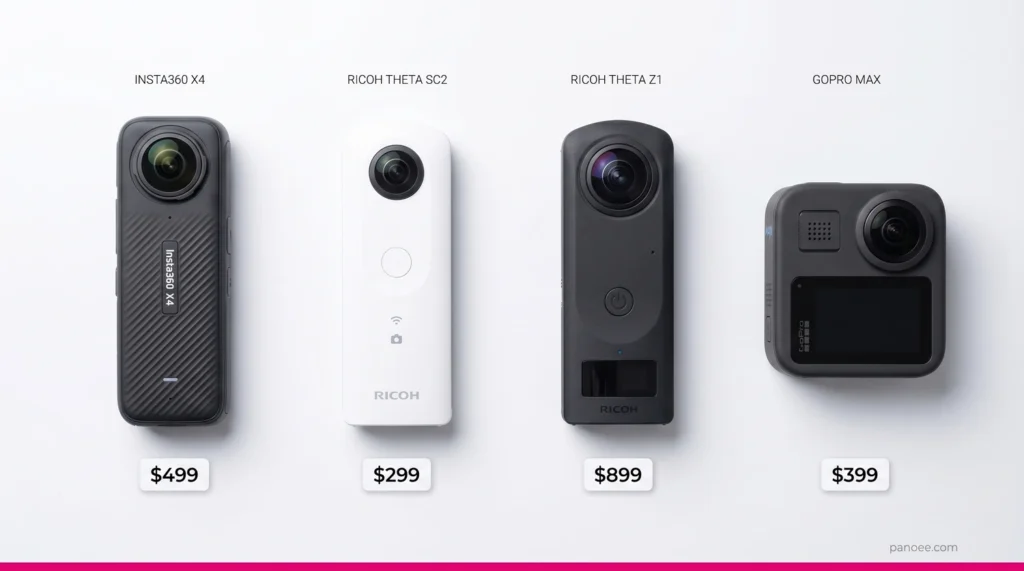
If you’re going the DIY software route, you need a 360° camera. For a detailed comparison of which cameras perform best for specific use cases — tested against Panoee’s upload and rendering pipeline — see the full best 360 cameras for virtual tours buying guide. Here’s the current market overview:
Consumer 360° Cameras (2026)
| Camera | Price | Max Resolution | Best For |
|---|---|---|---|
| Insta360 X4 | ~$499 | 8K | Real estate, hospitality, general use |
| Ricoh Theta Z1 | ~$899 | 6.7K | Real estate, architecture |
| Ricoh Theta SC2 | ~$299 | 5.7K | Budget entry point |
| Kandao QooCam 8K | ~$629 | 8K | High-detail interior work |
| GoPro MAX | ~$399 | 5.6K | Outdoor, active environments |
If you shoot with an Insta360 and are looking for the right tools to manage your 360° output after capture, the Insta360 software guide covers the full post-production workflow from device to published tour on Panoee.
Panoee’s platform supports up to 32K panoramas via its Multi-Resolution tiling engine, so any of these cameras will work well within the platform — the bottleneck will be your camera hardware, not the software.
Professional-Grade 360° Cameras
| Camera | Price | Notes |
|---|---|---|
| Ricoh Theta X | ~$799 | Professional tier, removable storage |
| Matterport Pro3 | ~$5,995 | 3D digital twin, requires Matterport subscription |
| Leica BLK360 | ~$16,000+ | LiDAR-grade accuracy, architecture/engineering |
For 95% of virtual tour use cases in real estate, hospitality, and education, a consumer camera in the $300–$900 range is entirely sufficient. The 360 real estate photography guide has specific camera recommendations for agents who want professional output without professional-tier equipment cost.
7. Cost Comparison: DIY Software vs. Hiring an Agency
When DIY Software Wins
| Scenario | Why DIY Wins |
|---|---|
| You need more than 3–4 tours per year | Per-shoot agency cost exceeds annual software cost quickly |
| You need to update tours frequently | Re-shoot costs compound; software makes updates near-free |
| You’re a photographer or content creator | You have the skills; software is pure leverage |
| Budget is under $500 for the first year | Panoee free plan + budget camera covers it |
| You want full control over branding | Software gives white-label; agencies own the output |
When Hiring an Agency Wins
| Scenario | Why Agency Wins |
|---|---|
| One-time project, no recurring need | Amortized over single use, software subscription isn’t worth it |
| You need Google Street View specifically | Requires certified photographer; DIY not viable |
| You lack time or technical skill | Agency delivers turnkey; your time has value |
| You need Matterport 3D digital twin | Requires Matterport hardware; agency provides it |
| Property is very large and complex | Professional logistics and equipment justify cost |
If you’re evaluating specific virtual tour companies to hire, the buyer’s guide covers vetting criteria, contract red flags, and what questions to ask before paying a deposit.
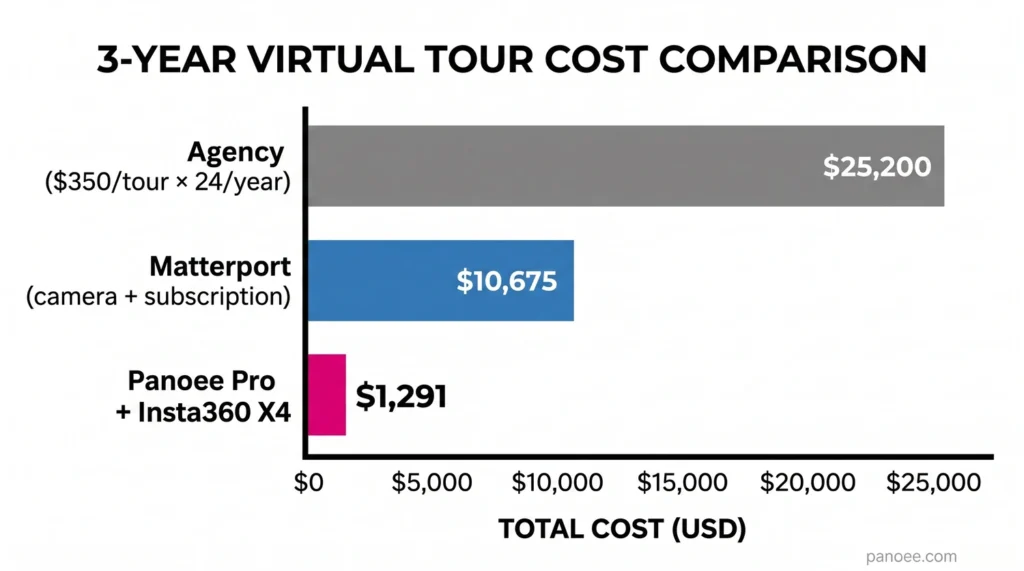
3-Year Total Cost of Ownership Comparison
Scenario: Real estate agent with 24 listings/year
| Approach | Year 1 Cost | Year 2 Cost | Year 3 Cost | 3-Year Total |
|---|---|---|---|---|
| Agency at $350/tour | $8,400 | $8,400 | $8,400 | $25,200 |
| Panoee Pro + Insta360 X4 camera | $763 ($264/yr + $499 camera) | $264 | $264 | $1,291 |
| Matterport subscription + Pro3 camera | $7,555 ($1,560/yr + $5,995) | $1,560 | $1,560 | $10,675 |
The math is not close. For volume users, software is structurally cheaper by an order of magnitude. The virtual tour real estate guide shows how agents who make this switch typically recoup the equipment cost within the first 2–3 listings.
8. How to Get a Professional-Quality Virtual Tour for Free
This is not a trick. Panoee’s free virtual tour app offers:
- Unlimited projects — no cap on how many tours you create
- 3 GB storage — enough for approximately 10–20 standard-resolution tours
- No watermarks on panoramas — your tours look fully professional
- 7 hotspot types — navigation, information, media, polygon, compact, eCommerce, and tour guide
- Multi-Resolution rendering — fast loading for up to 32K panoramas
- iFrame embedding — publish to any website without paying anything
The only features behind the paid wall are: custom domain, additional storage beyond 3 GB, white-label branding, team collaboration, and advanced analytics. The full breakdown of free vs. paid features is on the Panoee pricing page.
For an individual creator, small agency testing the platform, or business with fewer than 5 active tours, the free plan covers the vast majority of requirements.
How to Start for $0
- Sign up at panoee.com — no credit card required
- Upload your 360° photos (use your smartphone with a 360° lens attachment if you don’t have a dedicated camera)
- Add hotspots in the visual editor — the how to create a virtual tour guide covers every step with screenshots
- Set your tour to Public and share the link or embed it on your site
Total cost: $0. Total time to a live tour: under 30 minutes.
When You Need to Upgrade
The trigger for upgrading from free to Panoee Pro (~$22/month) is typically one of:
- You exceed 3 GB storage (roughly 20+ high-resolution tours)
- You need a custom domain (e.g., tours.yourbusiness.com instead of panoee.com/yourtourname)
- You need white-label presentation for clients
- You want advanced analytics and heat maps
At ~$22/month, Panoee Pro’s cost is recovered the moment you replace even a single agency-hired tour that would have cost $200+. For small business owners deciding whether the upgrade makes sense, the virtual tour for small business guide includes a break-even analysis based on how many tours you produce per year.
9. FAQ
How much does a virtual tour cost for a small business? A small business virtual tour costs $0–$500 depending on the approach. Using Panoee’s free plan with a consumer 360° camera, the software cost is $0 and the only investment is the camera ($300–$500 one-time). Hiring a professional for a Google Street View business tour typically runs $400–$600 as a one-time fee.
What is the cheapest way to create a virtual tour? The cheapest legitimate method is Panoee’s free virtual tour app combined with a budget 360° camera like the Ricoh Theta SC2 (~$299). Total first-year cost: under $300 for unlimited tours with no watermarks. Alternatives like smartphone panorama stitching exist but produce lower-quality results.
Does Matterport charge a monthly fee? Yes. Matterport requires an active subscription starting at $65/month for up to 5 active spaces. The Matterport Pro3 camera costs an additional $5,995. Total first-year cost with camera: approximately $6,775. For a detailed cost comparison, see the Matterport alternative breakdown.
How much does it cost to host a virtual tour? Hosting costs vary by platform. Matterport charges $5–$10/month per space over plan limits. Some agencies charge $50–$100/year per tour after year one. Panoee includes hosting in its subscription with no per-tour fees, and the free plan includes hosting at no cost. Full tier details are on the Panoee pricing page.
What affects virtual tour pricing the most? The single biggest cost driver is whether you’re hiring a professional or using virtual tour software yourself. After that: property size (for agency shoots), storage volume (for software platforms), and whether you need a custom domain or white-label branding (for software). Hardware quality (camera tier) is a one-time cost that affects quality but not ongoing expenses.
Can I create a virtual tour without buying a camera? Yes. Some platforms accept smartphone photos stitched into panoramas. For a more professional result, 360° cameras can be rented for $30–$80/day. The best 360 cameras for virtual tours guide covers the full equipment spectrum from budget rentals to professional-grade hardware.
Is there a free virtual tour software with no watermark? Yes — Panoee’s free virtual tour app is a free forever plan with no watermarks on panoramas. This is rare in the market: most competitors either limit published tours, add forced branding, or require a paid plan to remove watermarks. Panoee’s free plan is genuinely functional for professional use, not a crippled trial.
What is the ROI of a virtual tour for real estate? Properties with virtual tours sell faster and attract more online engagement. The National Association of Realtors has reported that virtual tours generate significantly more views per listing. For a typical $400,000–$600,000 property, a $300–$500 virtual tour investment represents 0.05%–0.1% of transaction value — a straightforward cost-benefit case for any serious listing agent. The full ROI analysis, including a cost-per-lead comparison across platforms, is in the virtual tour real estate guide.
