
Medya Alanındaki Görselleri Silme
Panoee projenizdeki Medya kitaplığında bulunan istemediğiniz görselleri nasıl sileceğinizi öğrenin.
Adımlar
-
Medya sekmesine gidin — Projenizi açın ve ana menüden Medya sekmesine gidin.

-
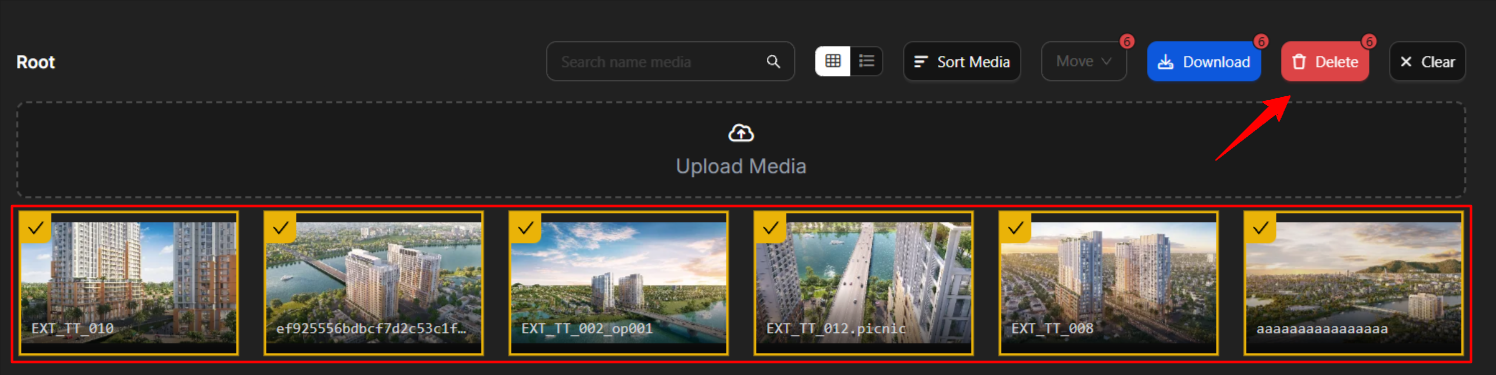
Görselleri seçin ve silin — Kaldırmak istediğiniz görselleri seçin. Birden fazla görsel seçmek için Shift tuşunu basılı tutun ve ardından Sil'e tıklayın.
Notlar
-
Silinen görseller geri getirilemez. Silmeden önce yedeklerinizin olduğundan emin olun.
-
Birden fazla görseli aynı anda silmek için Shift+klik ile seçim yapabilirsiniz.
